
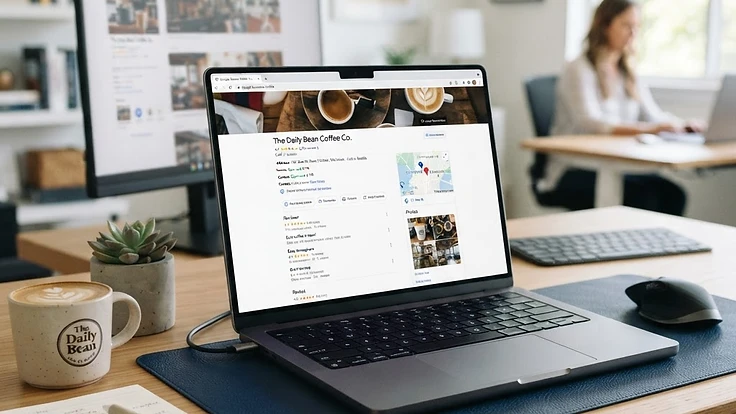
Your Google Business Profile (GBP) — formerly Google My Business — is the box that appears on the right side of Google when someone searches for your business name, and the listing that appears in Google Maps results.
For local businesses, it's the single most powerful free marketing tool available. A well-optimised GBP can drive more calls, website visits, and direction requests than any other channel. Here's how to optimise every part of it.
Claim and Verify Your Profile
If you haven't claimed your profile, go to business.google.com and follow the verification process. Google will send a postcard with a verification code to your business address (or verify by phone/email/video for eligible businesses).
Until you're verified, you can't edit your information or respond to reviews — and you won't appear in local search results properly.
Choose the Right Primary Category
Your primary category is the #1 ranking factor for local search. Google uses it to decide which searches to show you for.
Choose the most specific category that fits:
- Day Spa (not just "Spa")
- Massage Spa (if massage is your focus)
- Wellness Center (for broader wellness services)
- Skin Care Clinic (for facial-focused businesses)
Don't choose a broad category like "Health" or "Beauty" — you'll compete with businesses that have more specific, relevant categories.
Complete Every Field — Thoroughly
Google rewards complete profiles. Fill in:
- Business name: Your real, legal name. Don't add keywords ("Spa Bangalore Best Massage") — Google will suspend you.
- Address: Your exact physical address. If you operate from home, use your home address but keep it private.
- Service area: List the cities or postcodes you serve if you travel to customers.
- Hours: Update for holidays and festivals. Inconsistent hours hurt your ranking.
- Phone: Use a local number if possible — it signals local presence.
- Website: Link to your most relevant page (your homepage or a location-specific page).
- Opening date: Adding your founding date builds credibility.
Write a Keyword-Rich Description
Your description has 750 characters. Use them wisely:
- Lead with your primary service and city
- List your key services naturally (don't keyword-stuff)
- Mention what makes you different
- Include a call-to-action
Example: "Award-winning day spa in Bengaluru offering deep tissue massage, aromatherapy, facials, and couples packages. Our certified therapists use premium organic products. Book your session today."
Add Services and Products
List every service you offer with a description and price. This helps Google match you to specific searches ("deep tissue massage" vs just "spa").
Customers also see these services directly in your profile, making it easier for them to choose and book.
Upload High-Quality Photos — Lots of Them
Businesses with 100+ photos get significantly more direction requests and website clicks than those with fewer. Upload:
- Exterior photos: Help customers find you
- Interior photos: Show your atmosphere and cleanliness
- Team photos: Build trust and familiarity
- Service photos: Show what to expect
- Before/after photos: Demonstrate results (where appropriate)
Use natural lighting and avoid stock photos — Google and customers both prefer authentic images.
Post Regular Updates
Google Business Profile lets you post updates — short posts with photos, text, and a call-to-action. They appear in your profile and can show in search results.
Post at least twice a month:
- New services or packages
- Seasonal offers
- Events or workshops
- Helpful tips and advice
Regular posting signals to Google that your business is active and engaged.
Collect and Respond to Reviews
Reviews are the second most important local ranking factor after your primary category. They also directly influence whether customers choose you.
Ask every happy customer for a review. Send them a direct link to your review page via WhatsApp or email. Make it easy — one tap, 30 seconds.
Respond to every review:
- Positive: Thank them by name and mention something specific
- Negative: Apologise, acknowledge their experience, and offer to make it right offline
Never argue with a reviewer publicly. Future customers are watching how you handle criticism.
Enable Messaging
GBP lets customers message you directly from your profile. Enable it and respond within 24 hours — Google rewards fast responders with higher visibility.
Use the auto-reply feature to acknowledge messages instantly, even outside business hours.
Use Q&A Proactively
Customers can ask questions on your profile, and anyone can answer — including competitors. Don't leave this to chance.
Anticipate common questions and post them yourself:
- "Do you offer couples massages?"
- "What are your prices?"
- "Do I need to book in advance?"
Answer each one thoroughly. This pre-empts customer doubts and fills your profile with keyword-rich content.
Track Your Performance
GBP provides a free dashboard with insights on:
- Search queries that customers used to find you
- Actions taken (calls, website clicks, direction requests)
- Photo views and profile views
Review these monthly. If you're getting calls but no bookings, your phone handling needs work. If you're getting direction requests but no walk-ins, your location or signage might be unclear.
Want help optimising your Google Business Profile? DigiTurbo offers reputation management and local SEO for businesses across India. Book a free strategy call to get started.